CS2 Skins Explained: Floats, Patterns, and StatTrak
Why two identical-looking AK-47s can differ by $500: the breakdown of float values, pattern index, StatTrak, wear tiers, and case mechanics as they stand in 2026.
You opened a case, got an AK-47 Redline, looked it up on the Steam Market, and found listings from $3 to $30 for what looks like the same skin. That gap isn’t random. Three hidden numbers drive most of what makes one copy worth more than another: float value, pattern index, and a StatTrak counter. This page explains how each system works.
What Is a Skin Float? (The Wear Number Explained)
Every CS2 skin has a float value: a decimal between 0.00 and 1.00 assigned the moment the skin is created, whether unboxed, dropped, or pulled from a trade-up. The float is permanent. Playing the game, dying, winning matches, none of it changes the number. You can pass a skin between 100 players and the float never moves.
The float controls how worn the skin looks. A 0.001 float is almost mathematically perfect; a 0.95 float is heavily degraded. The visual difference depends on how the skin artist mapped wear onto that specific texture. Some skins look nearly identical at 0.07 and 0.20; others look completely different. Whatever the number is at creation, it stays that way forever.
The 5 Wear Tiers and Their Float Ranges
Valve groups float ranges into five named tiers shown on the Steam Market and in-game:
| Tier | Float range | What it typically looks like |
|---|---|---|
| Factory New (FN) | 0.00 - 0.07 | Minimal to no visible wear |
| Minimal Wear (MW) | 0.07 - 0.15 | Light surface marks, largely clean |
| Field-Tested (FT) | 0.15 - 0.38 | Visible wear, mid-range appearance |
| Well-Worn (WW) | 0.38 - 0.45 | Significant wear patterns |
| Battle-Scarred (BS) | 0.45 - 1.00 | Heavy damage, scratches, fading |
The tier label on a listing only tells you which bracket the skin falls in. Two Battle-Scarred skins can sit at 0.45 and 0.99: same label, very different appearance.
Why the Same Skin Can Look Totally Different (Per-Skin Float Caps)
Not every skin can hit every wear tier. Each skin has a minimum and maximum float cap set by Valve. A skin with a minimum float of 0.06 can never drop as Factory New, because no copy can exist below 0.06. A skin with a maximum float of 0.40 will never appear in Battle-Scarred.
This matters for pricing. If Factory New is rare or impossible for a specific skin, FN listings command a premium. If a skin’s minimum float sits at 0.15, every copy is Field-Tested or worse, so there’s no FN to chase. Before reading anything into a price gap, check the skin’s actual float caps. Float-checker sites surface this data per skin.
Pattern Index: The Other Number That Drives Value
Separate from float, every skin has a pattern index (also called the paint seed): an integer between 0 and 999 assigned at creation that determines how the texture is positioned and rotated on the weapon model. Float and pattern index are completely independent. A skin can have a low float and a bad pattern, or a high float and a rare pattern.
Pattern index has no inherent ordering. Seed 0 is not special by default. Seed 387 on an AK-47 Case Hardened might be worth thousands while seed 500 on the same skin sells at base price. The community has reverse-engineered which seeds produce desirable placements on specific skins, and those lists drive the premiums.
Which Skins Are Pattern-Dependent? (Case Hardened, Fade, Marble Fade)
Most skins tile their texture uniformly, so pattern index changes nothing meaningful. A handful have textures that vary enough for specific seeds to carry real premiums:
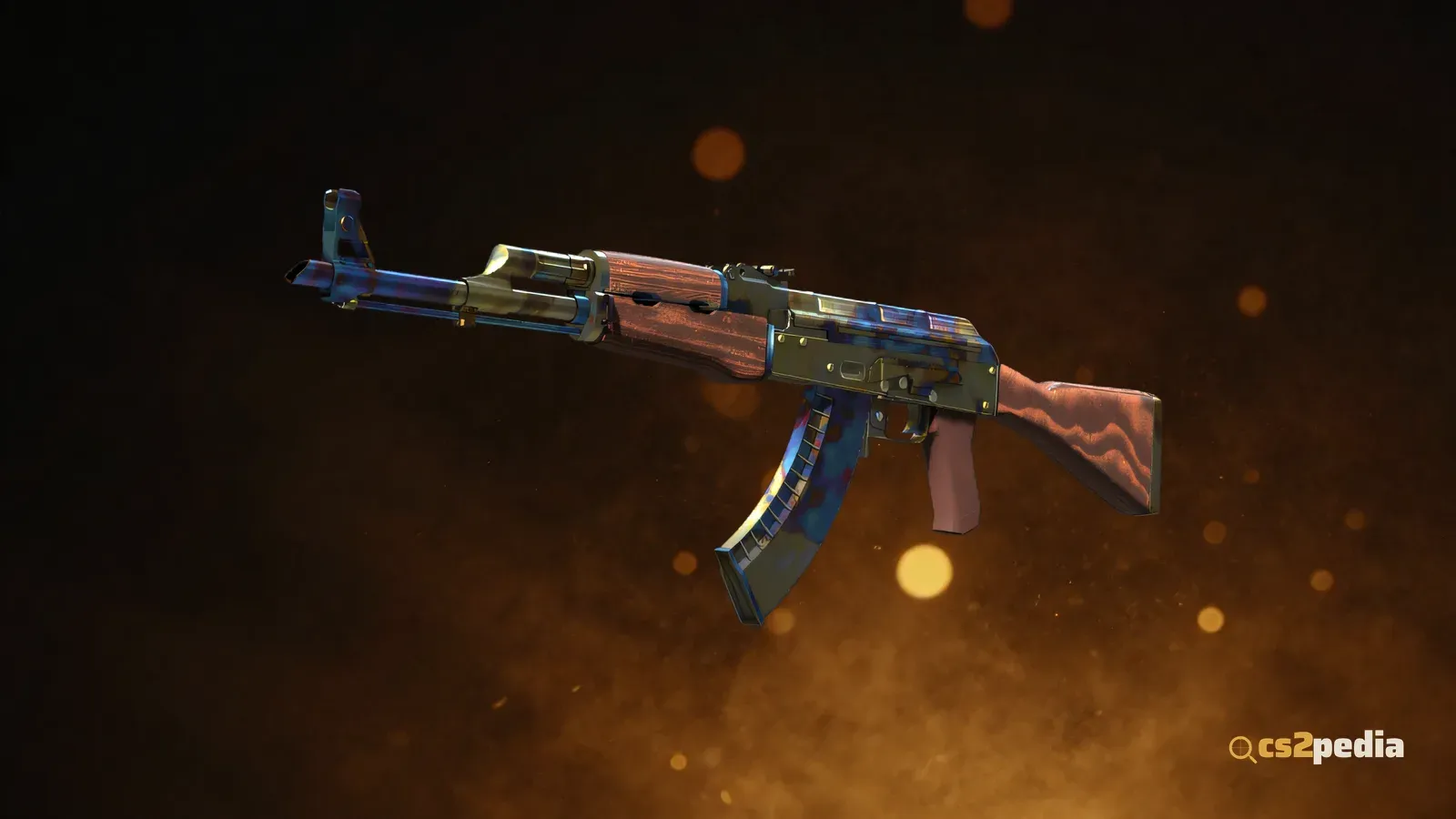
AK-47 Case Hardened is the blue-gem phenomenon. The texture mixes blue, gold, and gray patches. Certain seeds concentrate blue on the visible side of the weapon; the rarest are almost entirely blue on the body and are called “blue gems.” Community seed rankings exist for this skin specifically, and top-tier patterns sell for multiples of the base price.
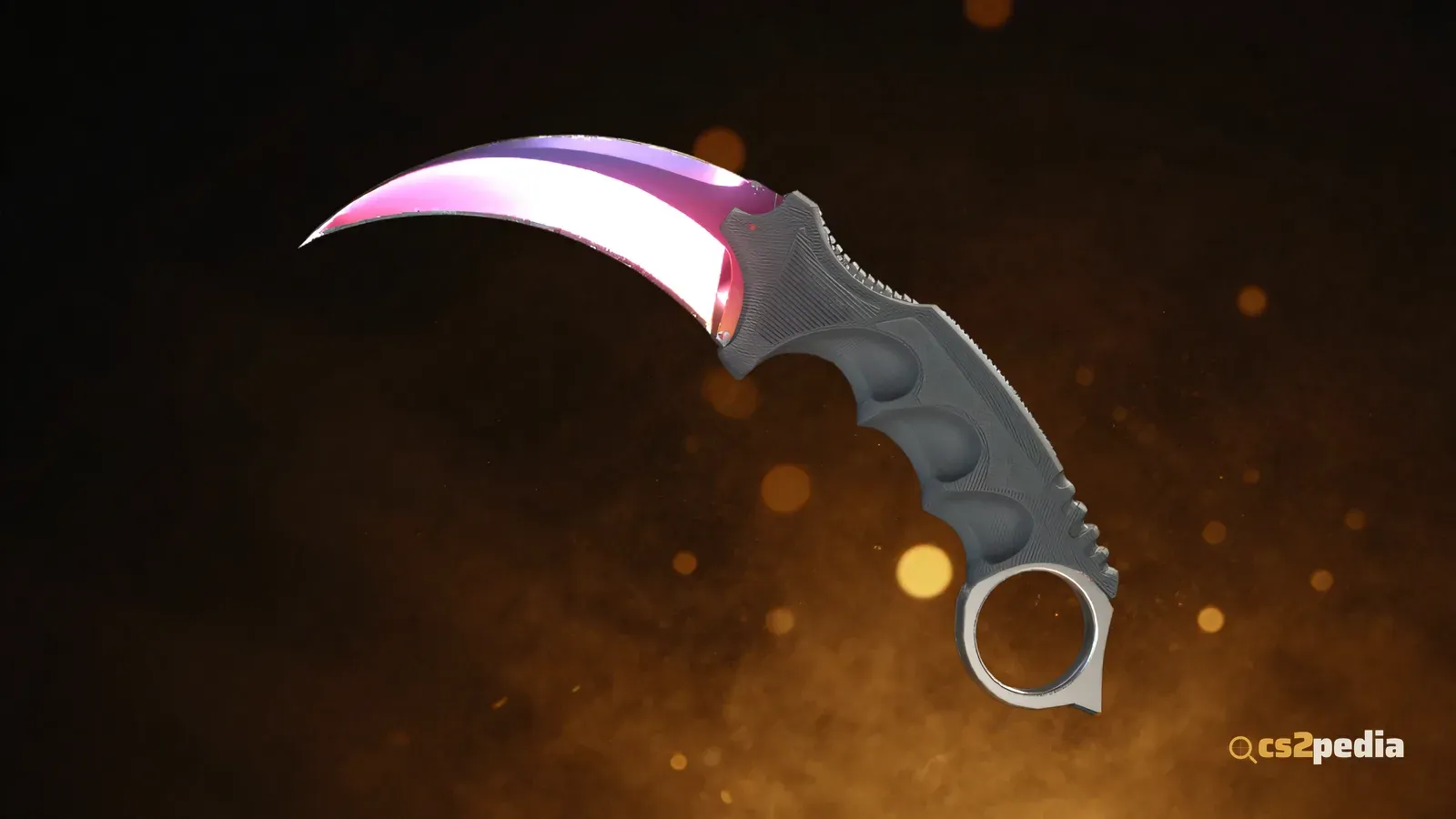
Karambit, Bayonet, and other Fade knives transition from yellow to orange to pink to purple. The seed determines what percentage of the blade shows each color. Higher fade percentages (more purple and pink) are more desirable, and community guides map specific seeds to fade percentages.
Marble Fade seeds determine the color layout. “Fire and Ice” patterns (red and blue, minimal yellow) and “Tricolor” patterns (red, blue, yellow in distinct bands) are tracked by the community and carry premiums over baseline marble fades.
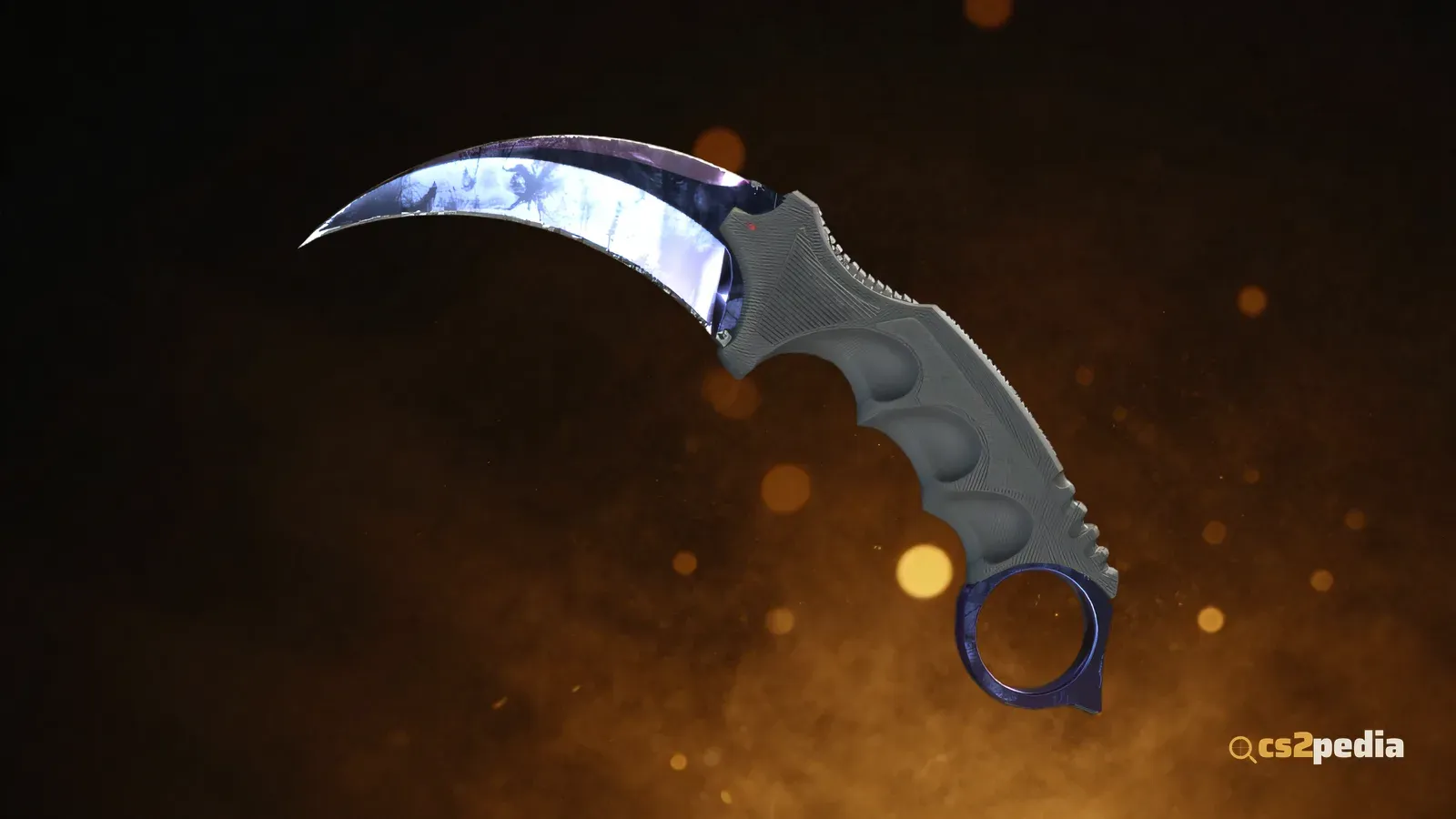
Doppler (knives and the M9 Bayonet) textures shift between colors. Within Doppler, seeds produce Phase 1 to 4 variants plus special variants: Ruby (all red), Sapphire (all blue), and Black Pearl. Those three are treated as separate rare drops within the Doppler family and are substantially more valuable than standard phases.
For any other skin, pattern index is largely irrelevant to price.
What Is StatTrak and How Does the Kill Counter Work?
StatTrak is a variant of a skin with an embedded kill counter: a number on the weapon body tracking how many kills you have with that specific item. When a case generates a skin, there’s roughly a 10% chance it comes out StatTrak instead of normal. StatTrak skins cost more across every rarity tier as a result.
The counter tracks kills made on official Valve servers only, and only kills you get with the skin equipped. Community servers display the counter but don’t increment it. Official matchmaking modes count: Competitive, Premier, Casual, Wingman, and Deathmatch.
Two reset conditions matter:
- Ownership transfer resets the counter to 0. Trade it, sell it on the Steam Market, or gift it, and the kill count starts over for the new owner. The counter belongs to the current holder, not the item’s history.
- The counter never goes negative or disappears. It only resets on transfer.
StatTrak Swap Tool: Transferring Your Kill Count
Valve sells a StatTrak Swap Tool in the in-game store. It’s sold as a two-pack for $0.99, and it lets you move a kill count from one StatTrak skin to another without losing the number to a reset.
Rules for the swap:
- Both skins must be StatTrak versions
- Both skins must be the same weapon type (you cannot move an AK-47 kill count to an M4A1-S, or a rifle count to a pistol)
- A swap uses one tool from the pack per use
This is useful when you upgrade from one StatTrak version to a better one. The swap preserves years of accumulated kills instead of losing them to a marketplace transaction.
Skin Rarity Tiers: From Consumer Grade to Covert (and Gold)
Each skin belongs to a rarity tier, shown as a color in-game and on the Market:
| Tier | Color | Notes |
|---|---|---|
| Consumer Grade | White | Common, low value |
| Industrial Grade | Light blue | |
| Mil-Spec | Blue | Most common case drops |
| Restricted | Purple | |
| Classified | Pink | |
| Covert | Red | Rare case drops |
| Exceedingly Rare / Gold | Yellow/gold | Knives and gloves |
Rarity determines base price range and drop probability from cases. A Covert from a case is roughly 120x rarer than a Mil-Spec from the same case (see the drop-rate table below for the numbers).
Case Drop Mechanics: How You Get Skins in 2026
Cases are the primary way new skins enter the economy. Each case holds a defined skin pool across rarity tiers. Opening one requires a case key bought from the in-game store ($2.49).
Valve published official odds in 2017 (to comply with China’s loot-box disclosure rules), and they haven’t changed in CS2:
| Rarity | Probability |
|---|---|
| Mil-Spec (blue) | 79.92% |
| Restricted (purple) | 15.98% |
| Classified (pink) | 3.20% |
| Covert (red) | 0.64% |
| Knife / Gloves (gold) | 0.26% (1 in 385) |
On top of these, any drop has roughly a 10% chance of being StatTrak, which splits each row further.
Weekly Care Package system. With Prime Status and one rank-up per week, you receive a Care Package: you’re offered 4 items and pick 2. As of January 22, 2026, Valve added the Harlequin and Achroma collections to the weekly drop pool and removed the Safehouse, Dust 2, 2018 Nuke, and 2018 Inferno collections. The active pool rotates periodically, so check the in-game item drop screen for the current list.
Rare case drops removed December 2025. Valve previously kept a hidden rare drop pool that could yield old cases worth $100 or more. It was removed without announcement on December 18, 2025. The pool no longer exists.
Trade-Up Contracts: Exchanging 10 for 1 (and the New Knife Craft)
A Trade-Up Contract takes 10 skins of the same rarity tier and produces 1 skin of the next tier up, from one of the input collections. Rules:
- All 10 inputs must be the same rarity (10 Mil-Spec produce 1 Restricted, and so on)
- Inputs can span different collections, but the output comes from one of the collections represented in the inputs
- StatTrak inputs produce a StatTrak output; normal inputs produce a normal output. You cannot mix the two
- As of the May 22, 2026 update, Souvenir skins can be used in trade-ups alongside normal skins, but the Souvenir property is stripped and the output is a normal skin. Souvenir and StatTrak inputs cannot be mixed in the same contract
The 5-Covert knife craft (October 23, 2025). Five Covert-quality skins can now be crafted into a knife or pair of gloves, with the result pulled from the input collections. Five StatTrak Covert inputs produce a StatTrak knife (gloves have no StatTrak variant, so the StatTrak path yields knives only). Only collections that actually contain a knife or glove drop are eligible: feed five Coverts from a single such collection and the gold item comes from that collection; mix collections and the game picks one in proportion to how many inputs came from each. Coverts from collections with no associated knife or glove can’t be used for this craft.
How Float Affects Trade-Up Output
This is one of the non-obvious parts of the system, and it’s where most outdated guides get it wrong. CS2 does not simply average the raw floats of your 10 inputs. It first normalizes each input to its own float range, averages those normalized values, then maps that average onto the output skin’s range.
Step by step:
- Normalize each input. For every input skin, convert its float to a 0-1 position within that skin’s own caps:
normalized = (float - inputMin) / (inputMax - inputMin). - Average the normalized values across all 10 inputs to get
avgNorm. - Map to the output range.
output_float = outputMin + avgNorm × (outputMax - outputMin).
The normalization step matters because two inputs with the same raw float can contribute differently. An input capped at 0.00-1.00 sitting at float 0.10 normalizes to 0.10, but an input capped at 0.00-0.50 at that same 0.10 float normalizes to 0.20, pushing the average twice as hard.
In practice: feed inputs that sit low within their own ranges and the output lands near the minimum for that skin; feed inputs that sit high in their ranges and you get a high-float output. Crafters exploit this on purpose, sourcing inputs with low normalized positions to push a high-value output toward Factory New. A skin with an output range of 0.00-0.07 (an FN-capped skin) needs a low normalized average to actually land Factory New.
Where to Check Your Float and Pattern
The Steam inventory page shows the wear tier label but not the actual float number or pattern index. To get those:
- In-game inspect. Right-click a skin in your inventory and select Inspect. The float shows in the item description area.
- Float-checker sites and browser extensions. Several third-party tools read the float and pattern index for any inspectable item, and the better ones cross-reference the pattern index against known rare-seed databases.
The pattern index number is only useful for the handful of pattern-dependent skins listed above. For everything else, the float is what you’re really looking at.